Home

fast-casual-fast-food-restaurants

The New Fast Food: How chains are responding to customer taste

The New Fast Food: How chains are responding to changing customer taste.

Fast food restaurants have become an inevitable part of our daily life. They not only offer us quick and delicious food, but are also easy on the wallet. You can satisfy your appetite by a burger or a slice of pizza in no time and fast food can taste amazingly well. But it is not only the taste or the quick preparation time that makes them so popular. Fast food restaurants are also low-cost, compared to other options available to us and hence it is of little surprise that they have gained so much popularity among the masses. In fact,  8 in 10 Americans eat fast food at least monthly, and 57 percent of young adults eat at a fast food restaurant at least once weekly.

But traditional fast food items have some adverse effects on our health as well. They are often very high in calories and fats, which can lead to medical complications in later life and they are also one of the major causes of the obesity epidemic in the United States. People are becoming more aware of this every day, and so they tend to veer towards foods, that are lower in fat and unnecessary calories. Does that mean the fast food era is about to end? Not at all. There has been a new concept in the restaurant market for quite some time now and the idea is gaining more and more popularity. The concept is called ‘Fast Casual’ restaurants.

What exactly is a fast casual restaurant?

The concept of Fast Casual is nothing new. Fast Casuals are basically a hybrid of normal restaurants and fast food joints. They offer food served quickly, but in a more professional manner, like the service you get in a ‘normal’ restaurant. In a fast casual restaurant, you would get all the traditional facilities that a restaurant offers and at the same time, you wouldn’t have to wait like you do in a restaurant, after ordering. The service is fast and you would be able to start eating within a few minutes of entering the restaurants.

The Concept Gains Popularity.

The ‘Fast Casual’ concept has been around for a while, but you were probably not aware of it. The idea is spreading, however, due to the low cost of the food, the fast service, and the healthier menu items. Numerous studies have shown that the traditional fast food, as we know it, contains many harmful ingredients for our body. And the young generation are more aware of this than any generation before them. Customers prefer their food less processed, lower in calories and with less fat and trans-fats, but at the same time, they expect the fast service, they they are accustomed to. Fast Casuals are just the kind of restaurants, that they have been looking for and hence they have become so popular. The fast casual market has grown by 550 percent since 1999, and the market now take home $25 billion per year. The traditional fast food restaurants still lead the way with $190 billion in annual revenue, but the fast casual growth is out pacing that of the traditional fast food segment. About one-third of consumers say that they are willing to pay more for healthier ingredients.

Because of the ever growing popularity, fast casual chains like Au Bon Pain, Blaze Pizza, LYFE Kitchen, Freshii, Sweetgreen have recently opened many new branches and according to them, customer prefer their food to traditional fast foods. Even the fast food giants like Pizza Hut and McDonalds are adding new, healthier fast casual menu items to their menu, in order to meet the need of the modern customer.

LYFE Kitchen is an acronym for Love Your Food Everyday, and all their menu items contain fewer than 600 calories and 1,000 milligrams of sodium. Another good  example, Shake Shack, offers antibiotic-, hormone- and GMO-free burgers, hot dogs and shakes.

What’s in Store for Fast Food?

Large fast food chains are taking notice. Taco Bell has developed an entire menu of vegetarian options and has been certified by the American Vegetarian Association. Pizza Hut has removed trans fat, artificial flavors and colors and monosodium glutamate from menu items. McDonald’s is adding whole-fruit clementines and yogurt to Happy Meals.

There is absolutely nothing to be worried about for fast food lovers. Fast Casuals restaurants are just making sure, that the food contain no trans-fats, and less artificial flavors or colors in them. Basically, all the harmful ingredients are being thrown out of the window and you should be rather delighted for this.
fast-casual-fast-food-restaurants
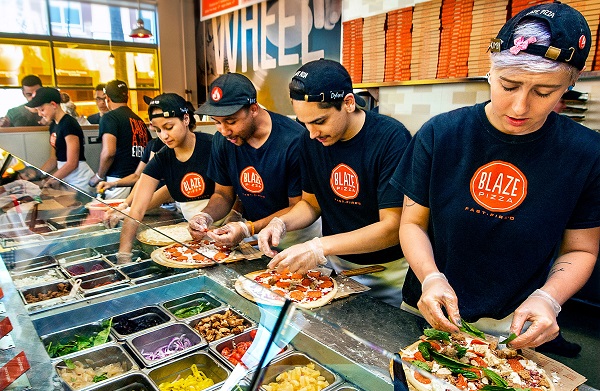
Blaze Pizza is one of he largest and fastest-growing chains in the fast-casual market. The segment typically has higher-quality ingredients, and higher prices, than fast food.
Burger King breakfast hours

Burger King Breakfast and Lunch Hours

Burger King Breakfast Hours.

If you love Burger King, then you probably love their breakfast too.

But at what time does Burger King stop serving breakfast and start serving lunch? And when does Burger King open and close on weekdays and on weekends?

Find all the answers here.

Burger King Breakfast and Lunch Hours.

Most Burger King restaurants open and start serving breakfast at 6 a.m. on weekdays and Saturdays. At some busy inner city locations, 24 hour restaurants and airport locations, the Burger King breakfast hours start at 5 a.m. or 5.30 a.m. All Burger King restaurants stop serving breakfast at 10:30 a.m on weekdays and Saturdays, at which time the Burger King Lunch Hours begin.

On Sundays, the Burger King Breakfast Hours start at 7 a.m and end at 11 a.m.


All Burger King Breakfast Hours


DayTime
Monday6:00 AM – 10:30 AM
Tuesday6:00 AM – 10:30 AM
Wednesday6:00 AM – 10:30 AM
Thursday6:00 AM – 10:30 AM
Friday6:00 AM – 10:30 AM
Saturday6:00 AM – 10:30 AM
Sunday7:00 AM – 11:00 AM

General Burger King Opening Hours.

These are the general opening and closing hours at Burger King. Opening times may vary at your local restaurant.


Burger King Opening Hours


DayTime
Monday6:00 AM – 12:00 AM
Tuesday6:00 AM – 12:00 AM
Wednesday6:00 AM – 12:00 AM
Thursday6:00 AM – 12:00 AM
Friday6:00 AM – 12:00 AM
Saturday6:00 AM – 12:00 AM
Sunday7:00 AM – 12:00 AM

Burger King Holiday Hours.

Burger King usually does not close for holidays. They do, however, observed reduced opening hours during these holidays:

  • Christmas Day
  • Thanksgiving Day
  • New Year’s Day

Always call your local Burger King first or use the Burger King Locator to see the exact opening times on any holiday.

We have added the full Burger King Menu and Burger King Breakfast Menu with prices here.

Burger King breakfast hours
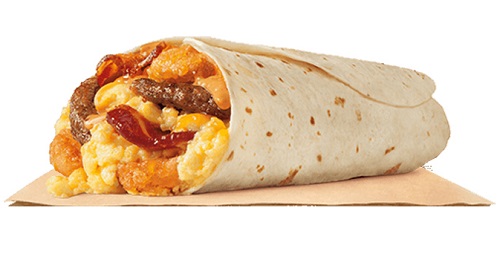
Burger King now serves the new ‘Eggnormous Breakfast Burrito’ at all locations. The company is rumoured to be considering an All Day Breakfast menu

Create a mood board to visualize the overall aesthetic and atmosphere

A mood board is a visual representation of the overall aesthetic and atmosphere of your design project. It’s a collage of images, colors, textures, and other elements that evoke the desired mood and feeling. Here’s a step-by-step guide to creating a mood board:

Step 1: Gather Materials

Printed copies of your design concept sketches or previous work
Magazines, catalogs, and books that inspire you
Fabric swatches, wallpaper samples, or other materials that add texture and interest
Digital tools like Adobe Photoshop or Canva for creating a digital mood board

Step 2: Identify Key Elements

Identify the key elements that define the desired aesthetic and atmosphere:
Color palette: choose 2-3 core colors that evoke the desired mood
Typography: select font styles or typography that align with the mood
Imagery: identify the types of images that fit the mood (e.g., nature, cityscapes, abstract)
Texture: consider the textures that add depth and interest (e.g., rough, smooth, organic)
Mood words: identify key words that describe the desired mood (e.g., calm, energetic, playful)

Step 3: Create a Physical Mood Board

Use a large piece of cardboard, foam board, or paper to create a physical mood board
Arrange the gathered materials in a way that visually represents the desired aesthetic and atmosphere
Add notes, stickers, or other embellishments to reinforce key elements
Step back and review the board to ensure it effectively communicates the desired mood

Step 4: Create a Digital Mood Board

Use Adobe Photoshop or Canva to create a digital mood board
Choose a background color or texture that sets the tone for the design
Add layers for each key element (color palette, typography, imagery, texture)
Adjust sizes, colors, and opacity to achieve the desired balance and visual interest
Save the mood board as a high-resolution file for future reference
Example Mood Board

Here’s an example mood board for a fictional coffee shop:

Physical Mood Board

Background: Warm beige cardboard
Color palette: Rich brown (#754975), creamy white (#F5F5F5), and deep green (#2E865F)
Typography: Serif font with a vintage feel (e.g., Playfair Display)
Imagery: Cozy coffee shop scenes with warm lighting, rustic wood accents, and lush greenery
Texture: Rough-hewn wooden planks and woven baskets
Mood words: Cozy, inviting, earthy

Digital Mood Board

[Image description: A digital mood board with a warm beige background. A rich brown color block sits at the top-left corner, with creamy white text overlay. A vintage-style font reads “Cozy Cup Coffee” in bold letters. Below this is a collage of coffee shop scenes with warm lighting, rustic wood accents, and lush greenery. The background is textured with rough-hewn wooden planks and woven baskets.]

This mood board captures the desired aesthetic and atmosphere of the coffee shop: cozy, inviting, and earthy. The rich color palette and vintage typography evoke a sense of warmth and comfort, while the imagery conveys the rustic charm of the coffee shop.

Develop a list of keywords and concepts related to the brand

I’m happy to help! However, I need more information about the brand you’d like to develop a list of keywords and concepts for. Please provide me with some details about the brand

Step 1: Gather Materials

Printed copies of your design concept sketches or previous work
Magazines, catalogs, and books that inspire you
Fabric swatches, wallpaper samples, or other materials that add texture and interest
Digital tools like Adobe Photoshop or Canva for creating a digital mood board

Step 2: Identify Key Elements

Identify the key elements that define the desired aesthetic and atmosphere:
Color palette: choose 2-3 core colors that evoke the desired mood
Typography: select font styles or typography that align with the mood
Imagery: identify the types of images that fit the mood (e.g., nature, cityscapes, abstract)
Texture: consider the textures that add depth and interest (e.g., rough, smooth, organic)
Mood words: identify key words that describe the desired mood (e.g., calm, energetic, playful)

Step 3: Create a Physical Mood Board

Use a large piece of cardboard, foam board, or paper to create a physical mood board
Arrange the gathered materials in a way that visually represents the desired aesthetic and atmosphere
Add notes, stickers, or other embellishments to reinforce key elements
Step back and review the board to ensure it effectively communicates the desired mood

Step 4: Create a Digital Mood Board

Use Adobe Photoshop or Canva to create a digital mood board
Choose a background color or texture that sets the tone for the design
Add layers for each key element (color palette, typography, imagery, texture)
Adjust sizes, colors, and opacity to achieve the desired balance and visual interest
Save the mood board as a high-resolution file for future reference
Example Mood Board

Here’s an example mood board for a fictional coffee shop:

Physical Mood Board

Background: Warm beige cardboard
Color palette: Rich brown (#754975), creamy white (#F5F5F5), and deep green (#2E865F)
Typography: Serif font with a vintage feel (e.g., Playfair Display)
Imagery: Cozy coffee shop scenes with warm lighting, rustic wood accents, and lush greenery
Texture: Rough-hewn wooden planks and woven baskets
Mood words: Cozy, inviting, earthy

Digital Mood Board

[Image description: A digital mood board with a warm beige background. A rich brown color block sits at the top-left corner, with creamy white text overlay. A vintage-style font reads “Cozy Cup Coffee” in bold letters. Below this is a collage of coffee shop scenes with warm lighting, rustic wood accents, and lush greenery. The background is textured with rough-hewn wooden planks and woven baskets.]

This mood board captures the desired aesthetic and atmosphere of the coffee shop: cozy, inviting, and earthy. The rich color palette and vintage typography evoke a sense of warmth and comfort, while the imagery conveys the rustic charm of the coffee shop.

Deliver the final design files to stakeholders or clients

As a designer, you’ve put in the hard work to create a fantastic design. Now, it’s time to share the final files with your stakeholders or clients. Here’s a step-by-step guide to ensure a smooth and successful delivery

Step 1: Gather Materials

Printed copies of your design concept sketches or previous work
Magazines, catalogs, and books that inspire you
Fabric swatches, wallpaper samples, or other materials that add texture and interest
Digital tools like Adobe Photoshop or Canva for creating a digital mood board

Step 2: Identify Key Elements

Identify the key elements that define the desired aesthetic and atmosphere:
Color palette: choose 2-3 core colors that evoke the desired mood
Typography: select font styles or typography that align with the mood
Imagery: identify the types of images that fit the mood (e.g., nature, cityscapes, abstract)
Texture: consider the textures that add depth and interest (e.g., rough, smooth, organic)
Mood words: identify key words that describe the desired mood (e.g., calm, energetic, playful)

Step 3: Create a Physical Mood Board

Use a large piece of cardboard, foam board, or paper to create a physical mood board
Arrange the gathered materials in a way that visually represents the desired aesthetic and atmosphere
Add notes, stickers, or other embellishments to reinforce key elements
Step back and review the board to ensure it effectively communicates the desired mood

Step 4: Create a Digital Mood Board

Use Adobe Photoshop or Canva to create a digital mood board
Choose a background color or texture that sets the tone for the design
Add layers for each key element (color palette, typography, imagery, texture)
Adjust sizes, colors, and opacity to achieve the desired balance and visual interest
Save the mood board as a high-resolution file for future reference
Example Mood Board

Here’s an example mood board for a fictional coffee shop:

Physical Mood Board

Background: Warm beige cardboard
Color palette: Rich brown (#754975), creamy white (#F5F5F5), and deep green (#2E865F)
Typography: Serif font with a vintage feel (e.g., Playfair Display)
Imagery: Cozy coffee shop scenes with warm lighting, rustic wood accents, and lush greenery
Texture: Rough-hewn wooden planks and woven baskets
Mood words: Cozy, inviting, earthy

Digital Mood Board

[Image description: A digital mood board with a warm beige background. A rich brown color block sits at the top-left corner, with creamy white text overlay. A vintage-style font reads “Cozy Cup Coffee” in bold letters. Below this is a collage of coffee shop scenes with warm lighting, rustic wood accents, and lush greenery. The background is textured with rough-hewn wooden planks and woven baskets.]

This mood board captures the desired aesthetic and atmosphere of the coffee shop: cozy, inviting, and earthy. The rich color palette and vintage typography evoke a sense of warmth and comfort, while the imagery conveys the rustic charm of the coffee shop.

Consider different perspectives and opinions to ensure the design is widely accepted

When considering different perspectives and opinions, you’re ensuring that your design is inclusive, accessible, and appealing to a wide range of users. This approach helps to

Step 1: Gather Materials

Printed copies of your design concept sketches or previous work
Magazines, catalogs, and books that inspire you
Fabric swatches, wallpaper samples, or other materials that add texture and interest
Digital tools like Adobe Photoshop or Canva for creating a digital mood board

Step 2: Identify Key Elements

Identify the key elements that define the desired aesthetic and atmosphere:
Color palette: choose 2-3 core colors that evoke the desired mood
Typography: select font styles or typography that align with the mood
Imagery: identify the types of images that fit the mood (e.g., nature, cityscapes, abstract)
Texture: consider the textures that add depth and interest (e.g., rough, smooth, organic)
Mood words: identify key words that describe the desired mood (e.g., calm, energetic, playful)

Step 3: Create a Physical Mood Board

Use a large piece of cardboard, foam board, or paper to create a physical mood board
Arrange the gathered materials in a way that visually represents the desired aesthetic and atmosphere
Add notes, stickers, or other embellishments to reinforce key elements
Step back and review the board to ensure it effectively communicates the desired mood

Step 4: Create a Digital Mood Board

Use Adobe Photoshop or Canva to create a digital mood board
Choose a background color or texture that sets the tone for the design
Add layers for each key element (color palette, typography, imagery, texture)
Adjust sizes, colors, and opacity to achieve the desired balance and visual interest
Save the mood board as a high-resolution file for future reference
Example Mood Board

Here’s an example mood board for a fictional coffee shop:

Physical Mood Board

Background: Warm beige cardboard
Color palette: Rich brown (#754975), creamy white (#F5F5F5), and deep green (#2E865F)
Typography: Serif font with a vintage feel (e.g., Playfair Display)
Imagery: Cozy coffee shop scenes with warm lighting, rustic wood accents, and lush greenery
Texture: Rough-hewn wooden planks and woven baskets
Mood words: Cozy, inviting, earthy

Provide guidelines for using the logo effectively

Use the minimum size guideline to ensure the logo is visible and recognizable on various digital platforms, including social media, email, and website headers.

Step 1: Gather Materials

Printed copies of your design concept sketches or previous work
Magazines, catalogs, and books that inspire you
Fabric swatches, wallpaper samples, or other materials that add texture and interest
Digital tools like Adobe Photoshop or Canva for creating a digital mood board

Step 2: Identify Key Elements

Identify the key elements that define the desired aesthetic and atmosphere:
Color palette: choose 2-3 core colors that evoke the desired mood
Typography: select font styles or typography that align with the mood
Imagery: identify the types of images that fit the mood (e.g., nature, cityscapes, abstract)
Texture: consider the textures that add depth and interest (e.g., rough, smooth, organic)
Mood words: identify key words that describe the desired mood (e.g., calm, energetic, playful)

Step 3: Create a Physical Mood Board

Use a large piece of cardboard, foam board, or paper to create a physical mood board
Arrange the gathered materials in a way that visually represents the desired aesthetic and atmosphere
Add notes, stickers, or other embellishments to reinforce key elements
Step back and review the board to ensure it effectively communicates the desired mood

Step 4: Create a Digital Mood Board

Use Adobe Photoshop or Canva to create a digital mood board
Choose a background color or texture that sets the tone for the design
Add layers for each key element (color palette, typography, imagery, texture)
Adjust sizes, colors, and opacity to achieve the desired balance and visual interest
Save the mood board as a high-resolution file for future reference
Example Mood Board

Here’s an example mood board for a fictional coffee shop:

Physical Mood Board

Background: Warm beige cardboard
Color palette: Rich brown (#754975), creamy white (#F5F5F5), and deep green (#2E865F)
Typography: Serif font with a vintage feel (e.g., Playfair Display)
Imagery: Cozy coffee shop scenes with warm lighting, rustic wood accents, and lush greenery
Texture: Rough-hewn wooden planks and woven baskets
Mood words: Cozy, inviting, earthy

Digital Mood Board

[Image description: A digital mood board with a warm beige background. A rich brown color block sits at the top-left corner, with creamy white text overlay. A vintage-style font reads “Cozy Cup Coffee” in bold letters. Below this is a collage of coffee shop scenes with warm lighting, rustic wood accents, and lush greenery. The background is textured with rough-hewn wooden planks and woven baskets.]

This mood board captures the desired aesthetic and atmosphere of the coffee shop: cozy, inviting, and earthy. The rich color palette and vintage typography evoke a sense of warmth and comfort, while the imagery conveys the rustic charm of the coffee shop.

Color palette selection, contrast, and harmony

The wonderful world of color!

Color palette selection, contrast, and harmony are essential elements in designing visually appealing and effective visual communications. Here’s a breakdown of each:

Color Palette Selection

A color palette is a selection of colors used in a design project. When choosing a color palette, consider the following:

Step 1: Gather Materials

Printed copies of your design concept sketches or previous work
Magazines, catalogs, and books that inspire you
Fabric swatches, wallpaper samples, or other materials that add texture and interest
Digital tools like Adobe Photoshop or Canva for creating a digital mood board

Step 2: Identify Key Elements

Identify the key elements that define the desired aesthetic and atmosphere:
Color palette: choose 2-3 core colors that evoke the desired mood
Typography: select font styles or typography that align with the mood
Imagery: identify the types of images that fit the mood (e.g., nature, cityscapes, abstract)
Texture: consider the textures that add depth and interest (e.g., rough, smooth, organic)
Mood words: identify key words that describe the desired mood (e.g., calm, energetic, playful)

Step 3: Create a Physical Mood Board

Use a large piece of cardboard, foam board, or paper to create a physical mood board
Arrange the gathered materials in a way that visually represents the desired aesthetic and atmosphere
Add notes, stickers, or other embellishments to reinforce key elements
Step back and review the board to ensure it effectively communicates the desired mood

Step 4: Create a Digital Mood Board

Use Adobe Photoshop or Canva to create a digital mood board
Choose a background color or texture that sets the tone for the design
Add layers for each key element (color palette, typography, imagery, texture)
Adjust sizes, colors, and opacity to achieve the desired balance and visual interest
Save the mood board as a high-resolution file for future reference
Example Mood Board

Here’s an example mood board for a fictional coffee shop:

Physical Mood Board

Background: Warm beige cardboard
Color palette: Rich brown (#754975), creamy white (#F5F5F5), and deep green (#2E865F)
Typography: Serif font with a vintage feel (e.g., Playfair Display)
Imagery: Cozy coffee shop scenes with warm lighting, rustic wood accents, and lush greenery
Texture: Rough-hewn wooden planks and woven baskets
Mood words: Cozy, inviting, earthy

Develop a more detailed design concept, including typography, color palette, and imagery

Based on the initial concept of a modern and futuristic travel company, I’d like to propose a more detailed design concept that incorporates typography, color palette, and imagery.

Step 1: Gather Materials

Printed copies of your design concept sketches or previous work
Magazines, catalogs, and books that inspire you
Fabric swatches, wallpaper samples, or other materials that add texture and interest
Digital tools like Adobe Photoshop or Canva for creating a digital mood board

Step 2: Identify Key Elements

Identify the key elements that define the desired aesthetic and atmosphere:
Color palette: choose 2-3 core colors that evoke the desired mood
Typography: select font styles or typography that align with the mood
Imagery: identify the types of images that fit the mood (e.g., nature, cityscapes, abstract)
Texture: consider the textures that add depth and interest (e.g., rough, smooth, organic)
Mood words: identify key words that describe the desired mood (e.g., calm, energetic, playful)

Step 3: Create a Physical Mood Board

Use a large piece of cardboard, foam board, or paper to create a physical mood board
Arrange the gathered materials in a way that visually represents the desired aesthetic and atmosphere
Add notes, stickers, or other embellishments to reinforce key elements
Step back and review the board to ensure it effectively communicates the desired mood

Step 4: Create a Digital Mood Board

Use Adobe Photoshop or Canva to create a digital mood board
Choose a background color or texture that sets the tone for the design
Add layers for each key element (color palette, typography, imagery, texture)
Adjust sizes, colors, and opacity to achieve the desired balance and visual interest
Save the mood board as a high-resolution file for future reference
Example Mood Board

Here’s an example mood board for a fictional coffee shop:

Physical Mood Board

Background: Warm beige cardboard
Color palette: Rich brown (#754975), creamy white (#F5F5F5), and deep green (#2E865F)
Typography: Serif font with a vintage feel (e.g., Playfair Display)
Imagery: Cozy coffee shop scenes with warm lighting, rustic wood accents, and lush greenery
Texture: Rough-hewn wooden planks and woven baskets
Mood words: Cozy, inviting, earthy

Brainstorm different concepts and variations

I’d be happy to help you brainstorm different concepts and variations. Can you please provide some more context or details about what you’re looking for? For example

Step 1: Gather Materials

Printed copies of your design concept sketches or previous work
Magazines, catalogs, and books that inspire you
Fabric swatches, wallpaper samples, or other materials that add texture and interest
Digital tools like Adobe Photoshop or Canva for creating a digital mood board

Step 2: Identify Key Elements

Identify the key elements that define the desired aesthetic and atmosphere:
Color palette: choose 2-3 core colors that evoke the desired mood
Typography: select font styles or typography that align with the mood
Imagery: identify the types of images that fit the mood (e.g., nature, cityscapes, abstract)
Texture: consider the textures that add depth and interest (e.g., rough, smooth, organic)
Mood words: identify key words that describe the desired mood (e.g., calm, energetic, playful)

Step 3: Create a Physical Mood Board

Use a large piece of cardboard, foam board, or paper to create a physical mood board
Arrange the gathered materials in a way that visually represents the desired aesthetic and atmosphere
Add notes, stickers, or other embellishments to reinforce key elements
Step back and review the board to ensure it effectively communicates the desired mood

Step 4: Create a Digital Mood Board

Use Adobe Photoshop or Canva to create a digital mood board
Choose a background color or texture that sets the tone for the design
Add layers for each key element (color palette, typography, imagery, texture)
Adjust sizes, colors, and opacity to achieve the desired balance and visual interest
Save the mood board as a high-resolution file for future reference
Example Mood Board

Here’s an example mood board for a fictional coffee shop:

Physical Mood Board

Background: Warm beige cardboard
Color palette: Rich brown (#754975), creamy white (#F5F5F5), and deep green (#2E865F)
Typography: Serif font with a vintage feel (e.g., Playfair Display)
Imagery: Cozy coffee shop scenes with warm lighting, rustic wood accents, and lush greenery
Texture: Rough-hewn wooden planks and woven baskets
Mood words: Cozy, inviting, earthy

Identify the key message and personality of the brand

I’d be happy to help you identify the key message and personality of a brand! To do this, I’ll need some information about the brand.

Step 1: Gather Materials

Printed copies of your design concept sketches or previous work
Magazines, catalogs, and books that inspire you
Fabric swatches, wallpaper samples, or other materials that add texture and interest
Digital tools like Adobe Photoshop or Canva for creating a digital mood board

Step 2: Identify Key Elements

Identify the key elements that define the desired aesthetic and atmosphere:
Color palette: choose 2-3 core colors that evoke the desired mood
Typography: select font styles or typography that align with the mood
Imagery: identify the types of images that fit the mood (e.g., nature, cityscapes, abstract)
Texture: consider the textures that add depth and interest (e.g., rough, smooth, organic)
Mood words: identify key words that describe the desired mood (e.g., calm, energetic, playful)

Step 3: Create a Physical Mood Board

Use a large piece of cardboard, foam board, or paper to create a physical mood board
Arrange the gathered materials in a way that visually represents the desired aesthetic and atmosphere
Add notes, stickers, or other embellishments to reinforce key elements
Step back and review the board to ensure it effectively communicates the desired mood

Step 4: Create a Digital Mood Board

Use Adobe Photoshop or Canva to create a digital mood board
Choose a background color or texture that sets the tone for the design
Add layers for each key element (color palette, typography, imagery, texture)
Adjust sizes, colors, and opacity to achieve the desired balance and visual interest
Save the mood board as a high-resolution file for future reference
Example Mood Board

Here’s an example mood board for a fictional coffee shop:

Physical Mood Board

Background: Warm beige cardboard
Color palette: Rich brown (#754975), creamy white (#F5F5F5), and deep green (#2E865F)
Typography: Serif font with a vintage feel (e.g., Playfair Display)
Imagery: Cozy coffee shop scenes with warm lighting, rustic wood accents, and lush greenery
Texture: Rough-hewn wooden planks and woven baskets
Mood words: Cozy, inviting, earthy

Create high-resolution files for various applications

Here are some examples of how to create high-resolution files for various applications

Step 1: Gather Materials

Printed copies of your design concept sketches or previous work
Magazines, catalogs, and books that inspire you
Fabric swatches, wallpaper samples, or other materials that add texture and interest
Digital tools like Adobe Photoshop or Canva for creating a digital mood board

Step 2: Identify Key Elements

Identify the key elements that define the desired aesthetic and atmosphere:
Color palette: choose 2-3 core colors that evoke the desired mood
Typography: select font styles or typography that align with the mood
Imagery: identify the types of images that fit the mood (e.g., nature, cityscapes, abstract)
Texture: consider the textures that add depth and interest (e.g., rough, smooth, organic)
Mood words: identify key words that describe the desired mood (e.g., calm, energetic, playful)

Step 3: Create a Physical Mood Board

Use a large piece of cardboard, foam board, or paper to create a physical mood board
Arrange the gathered materials in a way that visually represents the desired aesthetic and atmosphere
Add notes, stickers, or other embellishments to reinforce key elements
Step back and review the board to ensure it effectively communicates the desired mood

Step 4: Create a Digital Mood Board

Use Adobe Photoshop or Canva to create a digital mood board
Choose a background color or texture that sets the tone for the design
Add layers for each key element (color palette, typography, imagery, texture)
Adjust sizes, colors, and opacity to achieve the desired balance and visual interest
Save the mood board as a high-resolution file for future reference
Example Mood Board

Here’s an example mood board for a fictional coffee shop:

Physical Mood Board

Background: Warm beige cardboard
Color palette: Rich brown (#754975), creamy white (#F5F5F5), and deep green (#2E865F)
Typography: Serif font with a vintage feel (e.g., Playfair Display)
Imagery: Cozy coffee shop scenes with warm lighting, rustic wood accents, and lush greenery
Texture: Rough-hewn wooden planks and woven baskets
Mood words: Cozy, inviting, earthy

Gather feedback and incorporate revisions to improve the design

The iterative design process! Here’s a step-by-step guide on how to gather feedback and incorporate revisions to improve the design

Step 1: Gather Materials

Printed copies of your design concept sketches or previous work
Magazines, catalogs, and books that inspire you
Fabric swatches, wallpaper samples, or other materials that add texture and interest
Digital tools like Adobe Photoshop or Canva for creating a digital mood board

Step 2: Identify Key Elements

Identify the key elements that define the desired aesthetic and atmosphere:
Color palette: choose 2-3 core colors that evoke the desired mood
Typography: select font styles or typography that align with the mood
Imagery: identify the types of images that fit the mood (e.g., nature, cityscapes, abstract)
Texture: consider the textures that add depth and interest (e.g., rough, smooth, organic)
Mood words: identify key words that describe the desired mood (e.g., calm, energetic, playful)

Step 3: Create a Physical Mood Board

Use a large piece of cardboard, foam board, or paper to create a physical mood board
Arrange the gathered materials in a way that visually represents the desired aesthetic and atmosphere
Add notes, stickers, or other embellishments to reinforce key elements
Step back and review the board to ensure it effectively communicates the desired mood

Step 4: Create a Digital Mood Board

Use Adobe Photoshop or Canva to create a digital mood board
Choose a background color or texture that sets the tone for the design
Add layers for each key element (color palette, typography, imagery, texture)
Adjust sizes, colors, and opacity to achieve the desired balance and visual interest
Save the mood board as a high-resolution file for future reference
Example Mood Board

Here’s an example mood board for a fictional coffee shop:

Physical Mood Board

Background: Warm beige cardboard
Color palette: Rich brown (#754975), creamy white (#F5F5F5), and deep green (#2E865F)
Typography: Serif font with a vintage feel (e.g., Playfair Display)
Imagery: Cozy coffee shop scenes with warm lighting, rustic wood accents, and lush greenery
Texture: Rough-hewn wooden planks and woven baskets
Mood words: Cozy, inviting, earthy

Digital Mood Board

[Image description: A digital mood board with a warm beige background. A rich brown color block sits at the top-left corner, with creamy white text overlay. A vintage-style font reads “Cozy Cup Coffee” in bold letters. Below this is a collage of coffee shop scenes with warm lighting, rustic wood accents, and lush greenery. The background is textured with rough-hewn wooden planks and woven baskets.

Typography font choice, size, and spacing

Typography is a crucial aspect of visual design, and choosing the right font, size, and spacing can greatly impact the readability, aesthetics, and overall effectiveness of your design. Here are some guidelines to help you make informed decisions

Step 1: Gather Materials

Printed copies of your design concept sketches or previous work
Magazines, catalogs, and books that inspire you
Fabric swatches, wallpaper samples, or other materials that add texture and interest
Digital tools like Adobe Photoshop or Canva for creating a digital mood board

Step 2: Identify Key Elements

Identify the key elements that define the desired aesthetic and atmosphere:
Color palette: choose 2-3 core colors that evoke the desired mood
Typography: select font styles or typography that align with the mood
Imagery: identify the types of images that fit the mood (e.g., nature, cityscapes, abstract)
Texture: consider the textures that add depth and interest (e.g., rough, smooth, organic)
Mood words: identify key words that describe the desired mood (e.g., calm, energetic, playful)

Step 3: Create a Physical Mood Board

Use a large piece of cardboard, foam board, or paper to create a physical mood board
Arrange the gathered materials in a way that visually represents the desired aesthetic and atmosphere
Add notes, stickers, or other embellishments to reinforce key elements
Step back and review the board to ensure it effectively communicates the desired mood

Step 4: Create a Digital Mood Board

Use Adobe Photoshop or Canva to create a digital mood board
Choose a background color or texture that sets the tone for the design
Add layers for each key element (color palette, typography, imagery, texture)
Adjust sizes, colors, and opacity to achieve the desired balance and visual interest
Save the mood board as a high-resolution file for future reference
Example Mood Board

Here’s an example mood board for a fictional coffee shop:

Physical Mood Board

Background: Warm beige cardboard
Color palette: Rich brown (#754975), creamy white (#F5F5F5), and deep green (#2E865F)
Typography: Serif font with a vintage feel (e.g., Playfair Display)
Imagery: Cozy coffee shop scenes with warm lighting, rustic wood accents, and lush greenery
Texture: Rough-hewn wooden planks and woven baskets
Mood words: Cozy, inviting, earthy

Digital Mood Board

[Image description: A digital mood board with a warm beige background. A rich brown color block sits at the top-left corner, with creamy white text overlay. A vintage-style font reads “Cozy Cup Coffee” in bold letters. Below this is a collage of coffee shop scenes with warm lighting, rustic wood accents, and lush greenery. The background is textured with rough-hewn wooden planks and woven baskets.]

This mood board captures the desired aesthetic and atmosphere of the coffee shop: cozy, inviting, and earthy. The rich color palette and vintage typography evoke a sense of warmth and comfort, while the imagery conveys the rustic charm of the coffee shop.

Select the most promising ideas and refine them

If you don’t have any ideas yet, we can start brainstorming together. What problem or area are you interested in exploring? Do you have a specific industry, market, or audience in mind?

Step 1: Gather Materials

Printed copies of your design concept sketches or previous work
Magazines, catalogs, and books that inspire you
Fabric swatches, wallpaper samples, or other materials that add texture and interest
Digital tools like Adobe Photoshop or Canva for creating a digital mood board

Step 2: Identify Key Elements

Identify the key elements that define the desired aesthetic and atmosphere:
Color palette: choose 2-3 core colors that evoke the desired mood
Typography: select font styles or typography that align with the mood
Imagery: identify the types of images that fit the mood (e.g., nature, cityscapes, abstract)
Texture: consider the textures that add depth and interest (e.g., rough, smooth, organic)
Mood words: identify key words that describe the desired mood (e.g., calm, energetic, playful)

Step 3: Create a Physical Mood Board

Use a large piece of cardboard, foam board, or paper to create a physical mood board
Arrange the gathered materials in a way that visually represents the desired aesthetic and atmosphere
Add notes, stickers, or other embellishments to reinforce key elements
Step back and review the board to ensure it effectively communicates the desired mood

Step 4: Create a Digital Mood Board

Use Adobe Photoshop or Canva to create a digital mood board
Choose a background color or texture that sets the tone for the design
Add layers for each key element (color palette, typography, imagery, texture)
Adjust sizes, colors, and opacity to achieve the desired balance and visual interest
Save the mood board as a high-resolution file for future reference
Example Mood Board

Here’s an example mood board for a fictional coffee shop:

Physical Mood Board

Background: Warm beige cardboard
Color palette: Rich brown (#754975), creamy white (#F5F5F5), and deep green (#2E865F)
Typography: Serif font with a vintage feel (e.g., Playfair Display)
Imagery: Cozy coffee shop scenes with warm lighting, rustic wood accents, and lush greenery
Texture: Rough-hewn wooden planks and woven baskets
Mood words: Cozy, inviting, earthy

Digital Mood Board

[Image description: A digital mood board with a warm beige background. A rich brown color block sits at the top-left corner, with creamy white text overlay. A vintage-style font reads “Cozy Cup Coffee” in bold letters. Below this is a collage of coffee shop scenes with warm lighting, rustic wood accents, and lush greenery. The background is textured with rough-hewn wooden planks and woven baskets.]

This mood board captures the desired aesthetic and atmosphere of the coffee shop: cozy, inviting, and earthy. The rich color palette and vintage typography evoke a sense of warmth and comfort, while the imagery conveys the rustic charm of the coffee shop.

Create rough sketches of ideas based on the research and planning

I’d be happy to help you create rough sketches of ideas based on your research and planning. However, I would need more information from you to get started.

Step 1: Gather Materials

Printed copies of your design concept sketches or previous work
Magazines, catalogs, and books that inspire you
Fabric swatches, wallpaper samples, or other materials that add texture and interest
Digital tools like Adobe Photoshop or Canva for creating a digital mood board

Step 2: Identify Key Elements

Identify the key elements that define the desired aesthetic and atmosphere:
Color palette: choose 2-3 core colors that evoke the desired mood
Typography: select font styles or typography that align with the mood
Imagery: identify the types of images that fit the mood (e.g., nature, cityscapes, abstract)
Texture: consider the textures that add depth and interest (e.g., rough, smooth, organic)
Mood words: identify key words that describe the desired mood (e.g., calm, energetic, playful)

Step 3: Create a Physical Mood Board

Use a large piece of cardboard, foam board, or paper to create a physical mood board
Arrange the gathered materials in a way that visually represents the desired aesthetic and atmosphere
Add notes, stickers, or other embellishments to reinforce key elements
Step back and review the board to ensure it effectively communicates the desired mood

Step 4: Create a Digital Mood Board

Use Adobe Photoshop or Canva to create a digital mood board
Choose a background color or texture that sets the tone for the design
Add layers for each key element (color palette, typography, imagery, texture)
Adjust sizes, colors, and opacity to achieve the desired balance and visual interest
Save the mood board as a high-resolution file for future reference
Example Mood Board

Here’s an example mood board for a fictional coffee shop:

Physical Mood Board

Background: Warm beige cardboard
Color palette: Rich brown (#754975), creamy white (#F5F5F5), and deep green (#2E865F)
Typography: Serif font with a vintage feel (e.g., Playfair Display)
Imagery: Cozy coffee shop scenes with warm lighting, rustic wood accents, and lush greenery
Texture: Rough-hewn wooden planks and woven baskets
Mood words: Cozy, inviting, earthy

Digital Mood Board

[Image description: A digital mood board with a warm beige background. A rich brown color block sits at the top-left corner, with creamy white text overlay. A vintage-style font reads “Cozy Cup Coffee” in bold letters. Below this is a collage of coffee shop scenes with warm lighting, rustic wood accents, and lush greenery. The background is textured with rough-hewn wooden planks and woven baskets.]

This mood board captures the desired aesthetic and atmosphere of the coffee shop: cozy, inviting, and earthy. The rich color palette and vintage typography evoke a sense of warmth and comfort, while the imagery conveys the rustic charm of the coffee shop.

Define the Brand’s Mission, Values, and Target audience

Based on the hypothetical brand, “EcoCycle,” a sustainable and eco-friendly company that provides recycling services to households and businesses, I will define the brand’s mission, values, and target audience.

Step 1: Gather Materials

Printed copies of your design concept sketches or previous work
Magazines, catalogs, and books that inspire you
Fabric swatches, wallpaper samples, or other materials that add texture and interest
Digital tools like Adobe Photoshop or Canva for creating a digital mood board

Step 2: Identify Key Elements

Identify the key elements that define the desired aesthetic and atmosphere:
Color palette: choose 2-3 core colors that evoke the desired mood
Typography: select font styles or typography that align with the mood
Imagery: identify the types of images that fit the mood (e.g., nature, cityscapes, abstract)
Texture: consider the textures that add depth and interest (e.g., rough, smooth, organic)
Mood words: identify key words that describe the desired mood (e.g., calm, energetic, playful)

Step 3: Create a Physical Mood Board

Use a large piece of cardboard, foam board, or paper to create a physical mood board
Arrange the gathered materials in a way that visually represents the desired aesthetic and atmosphere
Add notes, stickers, or other embellishments to reinforce key elements
Step back and review the board to ensure it effectively communicates the desired mood

Step 4: Create a Digital Mood Board

Use Adobe Photoshop or Canva to create a digital mood board
Choose a background color or texture that sets the tone for the design
Add layers for each key element (color palette, typography, imagery, texture)
Adjust sizes, colors, and opacity to achieve the desired balance and visual interest
Save the mood board as a high-resolution file for future reference
Example Mood Board

Here’s an example mood board for a fictional coffee shop:

Physical Mood Board

Background: Warm beige cardboard
Color palette: Rich brown (#754975), creamy white (#F5F5F5), and deep green (#2E865F)
Typography: Serif font with a vintage feel (e.g., Playfair Display)
Imagery: Cozy coffee shop scenes with warm lighting, rustic wood accents, and lush greenery
Texture: Rough-hewn wooden planks and woven baskets
Mood words: Cozy, inviting, earthy

Digital Mood Board

[Image description: A digital mood board with a warm beige background. A rich brown color block sits at the top-left corner, with creamy white text overlay. A vintage-style font reads “Cozy Cup Coffee” in bold letters. Below this is a collage of coffee shop scenes with warm lighting, rustic wood accents, and lush greenery. The background is textured with rough-hewn wooden planks and woven baskets.]

This mood board captures the desired aesthetic and atmosphere of the coffee shop: cozy, inviting, and earthy. The rich color palette and vintage typography evoke a sense of warmth and comfort, while the imagery conveys the rustic charm of the coffee shop.

Burger King Breakfast Menu with Prices

Burger King Breakfast Menu.

We have listed all the Burger King breakfast items and prices on one page, making it easier for you to calculate the breakfast costs before visitting your local Burger King. The menu includes combo prices and popular items like the ‘Croissantwich’ and the Egg and Sausage muffins.

Earlier this year Burger King introduced a new ‘Egg-Normous Breakfast Burrito’, stuffed with sausage, bacon, eggs, hash browns, cheese and served with picante sauce. It is priced at $3.49. A new ‘Whopperito’ burrito has now also been introduced.

You can see the complete menu at our Burger King Menu page.

The Burger King Breakfast Menu.

Burger King Breakfast Menu for Kids

Maple Flavor Oatmeal, Milk & Apple Slices$4.49

Burger King Breakfast Combos Menu

A Burger King breakfast combo include a Small Hash Browns and a Small Coffee.
You can upgrade to Medium Size for $0.69 or Large for $1.00

Croissan’wich with Egg & Cheese with Sausage, Bacon, or Ham$2.99
Croissan’wich with Egg & Cheese with Sausage, Bacon, or Ham – Meal$4.79
King Croissan’wich with Double Sausage, Ham & Sausage or Bacon & Sausage$3.69
King Croissan’wich with Double Sausage, Ham & Sausage or Bacon & Sausage – Meal$5.59
Fully Loaded Croissan’wich$4.29
Fully Loaded Croissan’wich – Meal$6.19
Two Croissan’wich – Meal$5.99
Muffin Sandwich with Egg & Cheese with Sausage, Bacon, or Ham$2.99
Muffin Sandwich with Egg & Cheese with Sausage, Bacon, or Ham – Meal$4.79
Biscuit Sandwich with Egg & Cheese with Sausage, Bacon, or Ham$2.99
Biscuit Sandwich with Egg & Cheese with Sausage, Bacon, or Ham – Meal$4.79
2 Sausage Burrito$2.89
2 Sausage Burritos – Meal$4.59
EggNormous Breakfast Burrito$3.49
EggNormous Breakfast Burrito – Meal$5.29
French Toast Sticks5 Pc.$1.99
French Toast Sticks – Meal5 Pc.$3.99
Maple Flavor Oatmeal – Meal$3.99
Two Cinnamon Rolls$2.89
Two Cinnamon Rolls – Meal$3.89
Bacon, Sausage, Egg & Cheese Biscuit (Limited Time)$3.69
Bacon, Sausage, Egg & Cheese Biscuit – Meal (Limited Time)$5.59
Hash Brown Burrito (Limited Time)$1.19
Hash Brown Burrito – Meal (Limited Time)$4.38

Burger King Breakfast Platters

Ultimate Breakfast Platter$4.89
Pancake & Sausage Platter$3.69

Burger King Breakfast Oatmeal

Fruit Topped Maple Flavor$1.99
Original$1.99

Burger King Breakfast ‘Value’ Menu

Sausage Burrito$1.19
Sausage Biscuit$1.00
Sausage & Cheese Muffin Sandwich$1.19
French Toast Sticks3 Pc.$1.00
Milk (Fat Free or Low-Fat Chocolate)$1.49
Hash BrownsSmall$1.00
Hash BrownsMedium$1.69
Hash BrownsLarge$1.89


The Official Burger King Breakfast Page can be found here.